
Choose a tech stack based on what you are building (web, mobile or both), how fast you need to launch, your budget, your developers' skills and how much you expect to grow. Popular, well-supported tools are usually the safest choice because they are easier to hire for and easier to fix.
Key takeaways
- A tech stack is the set of tools used to build and run your product.
- Every stack has four layers: frontend, backend, database and hosting.
- Pick the stack that fits your product, team, budget and timeline, not the one that is trending.
- Popular tools like React, Node.js and PostgreSQL are easier to hire for and get help with.
What is a tech stack?
A tech stack is the set of programming languages, tools and services used to build and run a website or app. You may also hear "technology stack" or "software stack." They mean the same thing.
Think of building a house: each part needs different materials. A tech stack is the same idea for software. It affects how fast you build, how much you spend and how easy it is to hire help.
Check that people want your product before you pick your tools. CB Insights studied 431 VC-backed startups that shut down since 2023 and found causes for 385 of them. Poor product-market fit played a part in 43% of them (CB Insights, March 2026). Product-market fit means enough people want your product and will pay for it. The stack matters, but it is rarely the biggest risk.
The parts of a tech stack explained
A tech stack has four main parts: the frontend, the backend, the database and hosting. Some stacks add extra tools for payments, email or analytics.
- Frontend — what users see and tap, e.g. React, Vue.js, Flutter. It sends requests to the backend.
- Backend — the logic that does the work, e.g. Node.js, Laravel, Python. It reads and writes data in the database.
- Database — where information is stored, e.g. PostgreSQL, MySQL, MongoDB.
- Hosting — the servers that keep it online, e.g. AWS, Azure, Vercel.
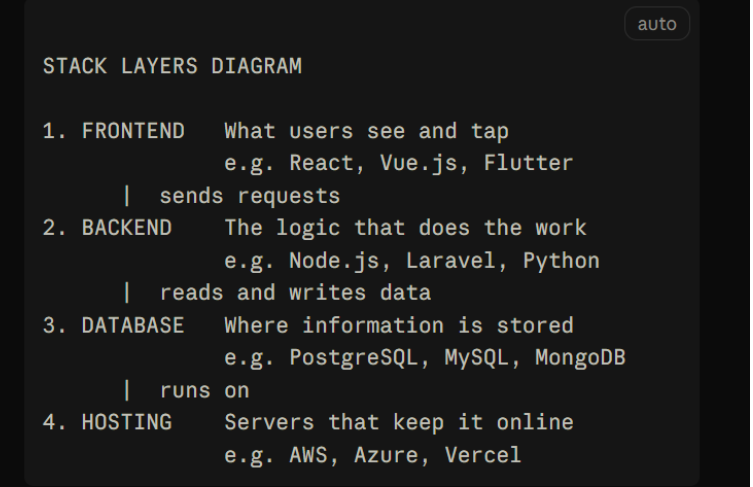
The frontend is everything users see and touch, like pages, buttons and forms. The backend is the hidden part that does the work, like checking a password or saving an order. Frontend vs backend is the simplest way to split any app. Think of a restaurant: the frontend is the dining room, and the backend is the kitchen.
The database is where your app stores information, such as users, orders and messages. Hosting means renting the servers that keep your app online all day.
Some tools combine layers. Supabase, an open-source backend platform built on PostgreSQL, gives you a database, user logins and an API in one service, so small teams can skip server setup.
6 questions to ask before choosing
Ask six questions: what you are building, how fast you must launch, what you can spend, who will build it, how much you expect to grow and what special features you need. Your answers narrow the list quickly.
- What are you building: web, mobile or both? A web app runs in a browser. A mobile app is installed from an app store. Online stores may fit ready-made platforms like Shopify or WooCommerce. For web and mobile, look at tools that share code, such as Flutter.
- How fast do you need to launch? An MVP, or minimum viable product, is the smallest version of your product that real users can try. Frameworks with built-in features and managed services help you reach it sooner.
- What is your budget? Count build cost, hosting and long-term upkeep. Open-source tools are free to use, but developer time is not. Many services have free plans for small projects, though prices rise as you grow.
- What skills does your team have? The best stack is often the one your developers already know. A team that knows PHP will ship faster with Laravel than with a tool it has never used. If you must hire, choose a stack with many available developers.
- How much growth do you expect? Most early products do not need to handle millions of users on day one. Choose tools that can grow later, like PostgreSQL, but do not over-build now.
- Does your product have special needs? Real-time chat, payments, AI features, maps or strict privacy rules can rule some tools in or out. List these must-haves first.
Not sure how your answers fit together? Piltox, an AI startup idea validation platform, turns a conversation about your idea into a blueprint with a recommended tech stack, matched across 23 technologies. It is free to start. Get a recommended tech stack for your idea.
Popular tech stack examples
Popular tech stack examples include MERN, Laravel and Next.js with Supabase. Each suits a different team and product. MERN is a stack made of MongoDB, Express, React and Node.js, all built on JavaScript.
| Stack | What is in it | Best for | Watch out for |
|---|---|---|---|
| MERN | MongoDB (database), Express and Node.js (backend), React (frontend) | Web apps and dashboards built by JavaScript teams | Flexible data gets messy without clear rules |
| Laravel | Laravel (PHP framework) with MySQL or PostgreSQL | Business sites, marketplaces and admin tools | Check you can hire Laravel developers locally |
| Next.js + Supabase | Next.js (React framework) and Supabase (backend and database) | MVPs and SaaS products from small teams | Costs and limits change as usage grows |
| Flutter + Firebase | Flutter (Google's mobile toolkit) and Firebase (Google's backend platform) | iOS and Android apps from one codebase | Ties you closely to Google services |
| Shopify or WooCommerce | Ready-made online store platforms | Stores that sell products online | Limits on custom features |
What is the best tech stack for a web app? There is no single best one. A safe starting point for many new web apps is JavaScript or TypeScript with React or Next.js, plus PostgreSQL. They are widely used, so help is easy to find. In the 2025 Stack Overflow Developer Survey, PostgreSQL was the most-used database, at 55.6% of all respondents and 58.2% of professional developers (Stack Overflow, 2025).
A worked example. This is an illustration, not a real customer. A non-technical founder wants a booking app for local fitness coaches. Her answers: web first, mobile later; launch in three months; small budget; no developers yet; payments and a calendar needed.
A sensible starting stack is Next.js for the frontend, Supabase for the backend and database, Stripe for payments and Vercel for hosting. One language covers the whole product, and a mobile app can come later. A Piltox blueprint puts this reasoning in one plan, next to your user roles and features.
Common mistakes
The most common tech stack mistakes are choosing by trend, over-building, ignoring your team's skills, using too many tools and skipping validation.
- Chasing trends. A new tool may have fewer developers, fewer guides and more bugs.
- Building for millions on day one. Complex setups cost more and slow your launch. Start simple.
- Ignoring who will maintain it. Someone must fix bugs and add features for years.
- Using too many tools. Each extra tool is one more thing to learn, pay for and update.
- Choosing before validating. A great stack cannot save a product nobody wants.
- Trusting one opinion. Get a second view from an independent developer or product expert before you commit.
FAQ
What is the best tech stack for a startup?
There is no single best tech stack for startups. The best one fits your product, budget, timeline and team. For many web startups, React or Next.js with Node.js and PostgreSQL is a safe, popular choice. For stores, Shopify or WooCommerce can save months. Choose tools with strong communities so help and hiring stay easy.
What is the difference between frontend and backend?
The frontend is what users see and use in their browser or app, such as pages, buttons and forms. The backend runs behind the scenes. It handles logins, payments, business rules and data. The two talk to each other constantly. A simple way to remember it: frontend is the dining room, backend is the kitchen.
Can I change my tech stack later?
Yes, but it costs time and money, and the cost grows as your product grows. Small changes, like swapping a hosting provider, are usually easy. Changing the programming language or database is harder. Pick well-supported tools now, keep your code organized, and revisit the choice when you have real users and real data.
Do I need to know how to code to choose a tech stack?
No. You need to understand the four layers and answer the six questions in this guide. Then ask a developer or product expert to check your plan. Focus on your users and features first. Let the technical team explain trade-offs in plain words. If they cannot, ask for a second opinion.
Get a recommended tech stack for your idea
Choosing a stack is easier when your idea is clear. Piltox helps you validate your idea and get a build-ready blueprint with a recommended tech stack. Want a human opinion? Book a 1-on-1 session with a product expert. It is free to start, with no credit card needed.
Get a recommended tech stack for your idea | Talk to an expert